

BIN Checker
Free BIN checker and IIN lookup. Enter the first 6 to 8 digits of a card to identify the issuing bank, brand, country, card level and currency in one click.
What is a BIN Checker?
A BIN Checker reads the first six to eight digits of a card number (the BIN, or Issuer Identification Number) and returns who issued the card. That covers the issuing bank, the network (Visa, Mastercard, Amex, JCB and so on), whether the card is credit, debit or prepaid, and the country of issuance. The numbering follows ISO/IEC 7812.
It is a reference tool. Merchants reach for it when a transaction looks odd, engineers when they are building routing logic, QA when they are writing fixtures, and analysts when they are sizing up a flagged card without leaving their browser.
We do not store the BINs you enter. The dataset is refreshed regularly, but issuers add, retire and reassign BIN ranges all the time, so individual entries can be incomplete or out of date between cycles.
For anything that drives a real financial decision, confirm the BIN with the issuer or with the card network’s own data. VCCGenerator.org makes no warranty about accuracy and is not the system of record for any payment network.
What is a Bank Identification Number (BIN)?
A Bank Identification Number (BIN), also called an Issuer Identification Number (IIN), is the first four to eight digits of a payment card. Credit cards, debit cards, prepaid cards and gift cards all carry one. The BIN tells the rest of the payment system three things at a glance: who issued the card, which network it runs on, and what kind of card it is.
The structure is defined by ISO/IEC 7812. The first digit is the Major Industry Identifier (MII), which marks the industry category: 4 for banking, 3 for travel and entertainment, and so on. The first six digits (including the MII) form the IIN that identifies the issuer. Some networks have been moving to eight-digit BINs to get finer-grained issuer identification as ranges fill up.
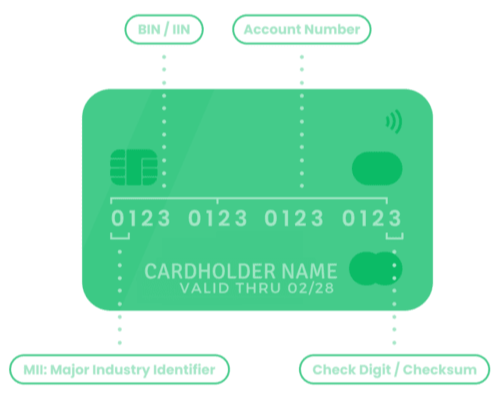
That metadata is what makes BIN data useful. Processors use it to route transactions to the right acquirer. Risk systems use it to weight country mismatch against the shipping address. Engineers use it to decide which form fields, currency or 3-D Secure flow to show. A good BIN lookup turns "16 digits starting with 4" into "Issuing Bank, Visa, classic credit, United States, USD".
The IIN and BIN reference table below lists the card brands the tool recognises, with their prefix ranges, expected card lengths, active status and validation method. Use it to identify a card by hand, or to double-check what your code should be doing for a given prefix.
| NETWORK | IIN/BIN RANGES | STATUS | LENGTH | VALIDATION | REGION |
|---|---|---|---|---|---|
| American Express | 34, 37 | Active | 15 | LUHN | Global |
| Bankcard | 5610, 560221–560225 | Inactive | 16 | LUHN | Australia (defunct) |
| BORICA | 2205 | Active | 16 | LUHN | Bulgaria |
| China T-Union | 31 | Active | 19 | LUHN | China |
| China UnionPay | 62, 81 (8100–8171, Discover-routed) | Active | 16, 19 | LUHN | China (Global acceptance) |
| Dankort | 5019 | Active | 16 | LUHN | Denmark |
| Dankort (Visa co-brand) | 4571 | Active | 16 | LUHN | Denmark |
| Diners Club enRoute | 2014, 2149 | Inactive | 15 | NONE | North America (defunct) |
| Diners Club International | 30, 36, 38, 39 | Active | 14, 16, 19 | LUHN | Global |
| Diners Club US & Canada | 55 | Active | 16 | LUHN | United States, Canada |
| Discover Card | 6011, 644–649, 65 | Active | 16, 19 | LUHN | Global |
| GPN (Gerbang Pembayaran Nasional) | 1946 (BNI cards), 50, 56, 58, 60–63 | Active | 16, 18, 19 | LUHN | Indonesia |
| Humo | 9860 | Active | 16 | LUHN | Uzbekistan |
| InstaPayment | 637–639 | Active | 16 | LUHN | Global |
| InterPayment | 636 | Active | 16, 19 | LUHN | Global |
| JCB | 3088–3094, 3096–3102, 3112–3120, 3158–3159, 3337–3349, 3528–3589 | Active | 16, 19 | LUHN | Global (Japan-based) |
| LankaPay | 357111 (JCB co-branded) | Active | 16 | LUHN | Sri Lanka |
| Laser | 6304, 6706, 6771, 6709 | Inactive | 16, 19 | LUHN | Ireland (defunct) |
| Maestro | 5018, 5020, 5038, 5893, 6304, 6759, 6761, 6762, 6763 | Sunset | 12, 19 | LUHN | Global (EU sunset) |
| Maestro (UK) | 6759, 676770, 676774 | Active | 12, 19 | LUHN | United Kingdom |
| Mastercard | 2221–2720, 51–55 | Active | 16 | LUHN | Global |
| Mir | 2200–2204 | Active | 16, 19 | LUHN | Russia |
| Napas | 9704 | Active | 16, 19 | LUHN | Vietnam |
| NPS Pridnestrovie | 6054740–6054744 | Inactive | 16 | LUHN | Pridnestrovian Moldavian Republic |
| RuPay | 60, 65, 81, 82, 508 | Active | 16 | LUHN | India |
| RuPay (JCB co-brand) | 353, 356 | Active | 16 | LUHN | India |
| Solo | 6334, 6767 | Inactive | 16, 18, 19 | LUHN | United Kingdom (defunct) |
| Switch | 4903, 4905, 4911, 4936, 564182, 633110, 6333, 6759 | Inactive | 16, 18, 19 | LUHN | United Kingdom (defunct) |
| Troy | 65 (Discover co-branded), 9792 | Active | 16 | LUHN | Turkey |
| UATP | 1 | Active | 15 | LUHN | Global (Airline travel) |
| UkrCard | 60400100–60420099 | Active | 16, 19 | LUHN | Ukraine |
| UzCard | 8600, 5614 | Active | 16 | LUHN | Uzbekistan |
| Verve | 506099–506198, 650002–650027, 507865–507964 | Active | 16, 18, 19 | LUHN | Nigeria |
| Visa | 4 | Active | 13, 16, 19 | LUHN | Global |
| Visa Electron | 4026, 417500, 4508, 4844, 4913, 4917 | Inactive | 16 | LUHN | Global |
Swipe sideways to view all columns.
Source: Wikipedia
How to Use BIN Checker?
Three steps.
-
Step 1. Type or paste a BIN or card number. A 6-digit prefix covers most lookups (for example,
400000for Visa or555555for Mastercard). For an 8-digit match, use a prefix stored at that length in our reference data, such as40008641. You can also paste a full test PAN: we try the longest matching prefix first (for example,4111111111111111resolves on the first 6 digits). Non-numeric characters are stripped, and the brand badge updates as you type.
-
Step 2. Solve the CAPTCHA. Pure abuse mitigation, nothing else.
- Step 3. Hit GET DETAILS. One round trip to the BIN database, one response back.
You get the issuing bank, brand, card type, country and issuer contact in a single result. The modals carry the full record, every field is copy-to-clipboard, and you can export the whole thing as JSON, CSV or TXT.
Why BIN data is worth looking at
Six digits carry a lot of information. The right BIN data turns a stream of digits into context: who issued this, where they sit, what kind of card it is. That context is what risk teams, processors, support teams and engineers all need to do their job, and it is rarely as cleanly packaged as it should be.
Compare the BIN issuing country to the shipping address or the IP address you enter. Flag prepaid ranges where your category has known abuse. Spot a card that does not look like the rest of the basket. None of these are proof on their own, but together they are a useful weight in any scoring model.
Knowing the network and card level early lets you route to the right acquirer, pick the right MID and apply the right interchange estimate. Getting that wrong is how transactions fail or settle into the wrong bucket.
Payment compliance and risk workflows benefit from clean BIN visibility. A BIN check is not a control on its own, but it helps you keep an honest audit trail of what you actually accepted.
When a customer calls in confused about a charge, the BIN tells you which bank to point them at. The included issuer phone number and website save a chargeback round-trip more often than you would expect.
Aggregate BIN data tells you how your customers actually pay: which networks, which countries, which card tiers. It is one of the cheapest sources of payment intelligence you have.
If you are building or testing payment code, BIN data lets you build fixtures that look like real card portfolios instead of "16 fours and a check digit". Easier to spot regressions when the test data matches the wild.
The BIN Checker is the quickest way to get to that information without writing your own scraper or paying a third-party service for a single lookup.
Who uses it
If your job involves looking at a card number on a screen and asking "where did this come from?", you are in the audience.
Confirm card characteristics before pushing a transaction, decide which gateway or MID to use, and keep your routing rules honest as networks add or move ranges.
Look at the BIN behind a flagged transaction. Compare the issuing country to the shipping or IP country, check the card type, and decide whether the pattern matches what you have seen before.
Build fixtures with realistic BIN distributions, verify your gateway configuration, and validate the routing logic in your integration tests.
Look up an issuer in 10 seconds when a customer calls about a charge. The issuer website and phone number on the result page save the round-trip more often than not.
Slice your customer base by network, country and card tier. Understand which BINs drive your refund and dispute rates, and which ones drive your repeat business.
Verify what you accepted for PCI and audit purposes, and check whether a specific transaction matches the geographic and card-type rules your organisation enforces.
How BIN Checker Works?
The lookup runs in four steps. Validate the input, verify the request, query the database, render the result. Everything follows ISO/IEC 7812 BIN conventions.
1. Input Validation & Real-Time Brand Detection
When you enter a BIN code, the tool performs immediate input validation and real-time brand detection. It automatically removes non-numeric characters, accepts 6 through 19 digits. Explicit 6- or 8-digit BINs are matched exactly; other lengths use the longest matching prefix in our database (often the first six digits), and performs pattern matching against known card brand ranges (Visa starts with 4, Mastercard ranges 51-55 or 2221-2720, American Express 34/37, etc.). The detected brand is displayed instantly in a badge within the input field, providing immediate feedback before submission.
Automatically removes spaces, dashes, and non-numeric characters to extract pure BIN digits.
Accepts 6 through 19 digits. Explicit 6- or 8-digit BINs match exactly; other lengths fall back to the longest prefix in our database.
Matches BIN against over 30 card brand patterns including Visa, Mastercard, American Express, Discover, JCB, Diners Club, China UnionPay, RuPay, and regional networks.
Shows detected brand badge inside input field as user types, providing instant visual feedback.
2. Security Verification & Database Query
Once the input passes, the request goes through reCAPTCHA. After verification, the BIN is sent to the backend over an AJAX POST with a CSRF token. The backend validates the captcha, cleans the BIN and runs an exact-length match against the BIN database. An 8-digit BIN only matches 8-digit records, and a 6-digit BIN only matches 6-digit records. We do not silently fall back, because falling back to a 6-digit answer for an 8-digit query is how you ship the wrong issuer to a customer.
Google reCAPTCHA validation prevents automated abuse and ensures legitimate usage.
AJAX POST request with CSRF token protection ensures secure data transmission.
Exact match search: 8-digit BIN searches only 8-digit records, 6-digit BIN searches only 6-digit records, preventing incorrect fallback matches.
The database covers every major payment network worldwide, plus the regional schemes that matter for our user base.
3. Data Retrieval & Response Processing
On a match, the backend returns the full issuer record: bank name, card brand, card type (credit, debit, prepaid), card level (classic, gold, platinum), country of issuance with ISO Alpha-2 and Alpha-3 codes, the issuer website and contact phone, and any notes attached to the range. It comes back as JSON. The frontend fills in "N/A" where a field is missing instead of pretending the data is there.
Pulls the full issuer record: bank name, brand, type, level, country and contact details, in one query.
Validates all fields, handles null/empty values, and applies "N/A" defaults for missing information.
Structures data in standardized JSON format for easy parsing and integration.
Provides specific error messages for 8-digit BINs not found (suggests trying 6-digit version) and generic messages for 6-digit BINs not found.
4. Result Display & User Interaction
Upon successful BIN lookup, the tool displays results in an organized card-based interface showing lifecycle status (ACTIVE, INACTIVE, DISCONTINUED, or UNKNOWN from our reference data), quick information summary (Brand, Type, Country), and validation checks (NETWORK lifecycle badge, DATABASE FOUND). Users can access detailed information through expandable modals: "BIN DETAILS" modal shows complete issuer information (BIN code, issuing bank, card brand, type, level, country), while "OTHER INFO" modal displays country codes, issuer website, and contact information. All data fields include copy-to-clipboard functionality, and results can be exported in JSON, CSV, or TXT formats with disclaimers and timestamps.
Displays results in organized card layout with status indicators, quick info summary, and validation badges.
Provides detailed views through "BIN DETAILS" and "OTHER INFO" modals with copy-to-clipboard functionality.
Enables export in JSON, CSV, or TXT formats with disclaimers, timestamps, and structured data.
Provides links to search other BINs from the same country using integrated BIN Search tool.
What Information Does the Tool Provide?
For every BIN you check, the tool returns the following fields (when the database has them):
Complete name of the financial institution that issued the card, enabling identification of the card-issuing bank for customer support, dispute resolution, and transaction verification purposes.
Payment network identification (Visa, Mastercard, American Express, Discover, JCB, Diners Club, China UnionPay, RuPay, etc.) for transaction routing, processing rule determination, and network-specific requirements.
Card type identification (Credit Card, Debit Card, Prepaid Card) for transaction processing rules, fraud risk assessment, and payment acceptance decisions.
Card tier identification (Classic, Gold, Platinum, Black, etc.) indicating card benefits, spending limits, and customer segment for business intelligence and marketing analysis.
Country of issuance with full country name, ISO 3166-1 Alpha-2 code (2-letter, e.g., "US"), and ISO 3166-1 Alpha-3 code (3-letter, e.g., "USA") for geographic risk assessment, fraud prevention, and compliance verification.
Issuer website URL and contact phone number for direct communication, customer support, dispute resolution, and verification purposes when needed.
Anything that is not on file shows up as "N/A" rather than as a guess. The lookup supports both 6-digit and 8-digit BINs with exact-length matching, so an 8-digit query will not silently match a 6-digit record from a different issuer.
Frequently Asked Questions (FAQ)
6-digit BINs are the traditional standard (ISO/IEC 7812) representing the Issuer Identification Number (IIN) that identifies the card-issuing institution. 8-digit BINs are extended BINs used by some modern payment systems for more granular issuer identification, allowing more specific identification of card products or issuer segments.
The BIN Checker supports both formats with exact matching: if you enter an 8-digit BIN, it searches only for 8-digit matches (no fallback to 6-digit to prevent incorrect information). If an 8-digit BIN is not found, the tool suggests trying the first 6 digits instead.
The dataset covers every major payment network worldwide and is refreshed roughly monthly to pick up new BIN ranges and issuer changes. Issuers move fast, though, so brand-new BINs can take a refresh cycle or two to show up.
We work hard at accuracy, but no public BIN database is perfect, and this one is no exception. Treat the results as a strong signal, not as proof. For anything that drives a real financial decision, confirm with the issuer or the financial institution directly.
Yes, as one signal in a wider fraud strategy. BIN data is useful for spotting geographic mismatches between issuer country and shipping address, flagging prepaid ranges in categories where they are abused, and confirming what the rest of your stack thinks about a card.
It is not enough on its own. Pair BIN signals with AVS, CVV checks, IP geolocation, device fingerprinting and transaction pattern analysis. Any one of those can be fooled. Together they make a sensible scoring model.
No. The BIN you enter is processed in memory for the lookup and then discarded. We do not store it in our application database. Requests run over HTTPS, and inputs are discarded when the response is returned. Standard server access logs are described in our Privacy Policy.
If a BIN is not found, it may be a newly issued BIN not yet in our database, a private-label BIN not publicly documented, or an incorrectly entered BIN. For 8-digit BINs not found, try entering the first 6 digits instead, as the tool will suggest.
If you have verified the BIN is correct but still not found, contact the card issuer directly for authoritative information. You can also contact us if you believe a BIN should be included in our database, and we'll review it for potential addition.
Yes. Results export in three formats: JSON for integration, CSV for spreadsheets and TXT for plain-text logs. Each export includes the full BIN record, the lookup timestamp and the standard disclaimer.
Exports are useful for record-keeping, integration with other systems, reporting, and documentation purposes. The JSON format is particularly useful for database seeding and automated processing.
Yes. No signup, no account, no hidden tier. Type a BIN, clear the CAPTCHA, get the result. Everything on this page is free.